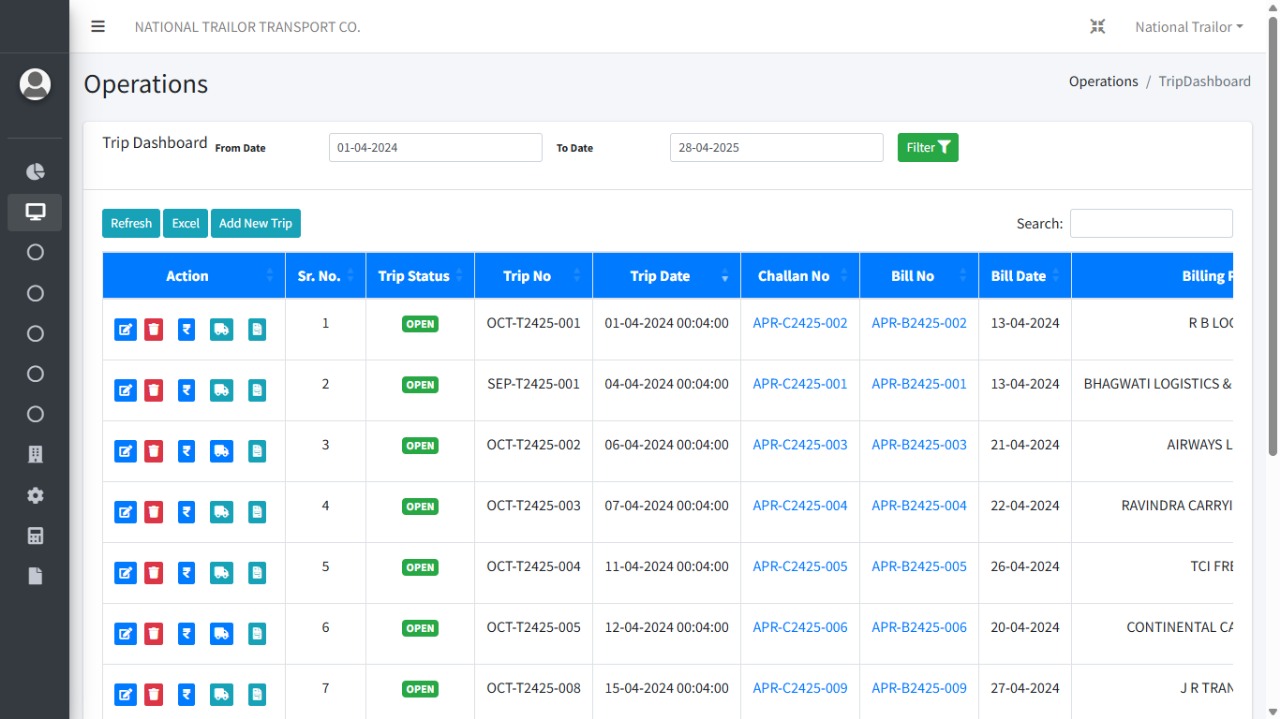
Smart List for Efficient Data Sorting & Searching Using Fleeeto ERP
Fleeeto ERP offers a Smart List feature that enables efficient sorting and searching of historical data like trip logs, billing, vehicle usage, and payment history. With real-time filters, instant search, and dynamic loading, teams can make faster decisions based on old data right from the website.
What Is a Smart List?
- Instant Search
Quickly search through thousands of old records including trips, payments, and clients.
- Sortable Columns
Sort data by trip ID, date, status, vehicle ID, and more to customize your view.
- Advanced Filters
Apply filters by date range, status, client, or location for precise results.
- Dynamic Loading
Uses AJAX-based pagination to load only needed data, reducing server load and improving performance.
- Export Options
Export filtered data to Excel or PDF for external reporting or offline analysis.
Challenges in Managing Old Data
- Large Data Volumes
Static pages can slow down or crash when thousands of records are loaded at once.
- Poor Search & Filter UX
Limited or hard-to-use filters make finding specific records a time-consuming task.
- Duplicate/Unclean Data
Historical records often contain inconsistent or redundant entries due to manual entry errors.
- Slow Load Times
Pages that don’t use lazy loading or pagination suffer from performance issues.
How Fleeeto Overcomes These Challenges
- Server-Side Pagination
Loads only relevant data per page via AJAX, keeping the interface responsive at scale.
- Custom Filters
Users can filter by client, status, time frame, and more without reloading the page.
- Master Data Validation
Prevents duplicate or mismatched records through centralized master entries.
- Real-Time Indexing
Updates become searchable immediately after they’re entered or modified.
- Role-Based Access
Only authorized users can view or modify specific Smart Lists, ensuring data integrity and security.
Tips for Using Smart Lists Effectively
- Use date filters to narrow down data instead of pulling everything.
- Export filtered views for reports and compliance needs.
- Save frequent filters as presets for quick access.
- Regularly archive unused data to maintain performance.
- Train users to use filters and sorting to reduce dependency on support.